
Samsung Galaxy F13 Repair — The Phone That Lives on the Charger
The Galaxy F13 carries a 6,000 mAh battery and charges at a relaxed 15W, so it spends a lot of its life plugged in. That keeps the charging port and the battery under steady strain. We start there: cable, port, cell and heat. Then the 6.6-inch screen and the board. Free diagnostic, price in writing.
What Our Customers Say
Customers across our four shops keep mentioning the same things: a plain explanation, no pressure, and a final bill that matched the quote.


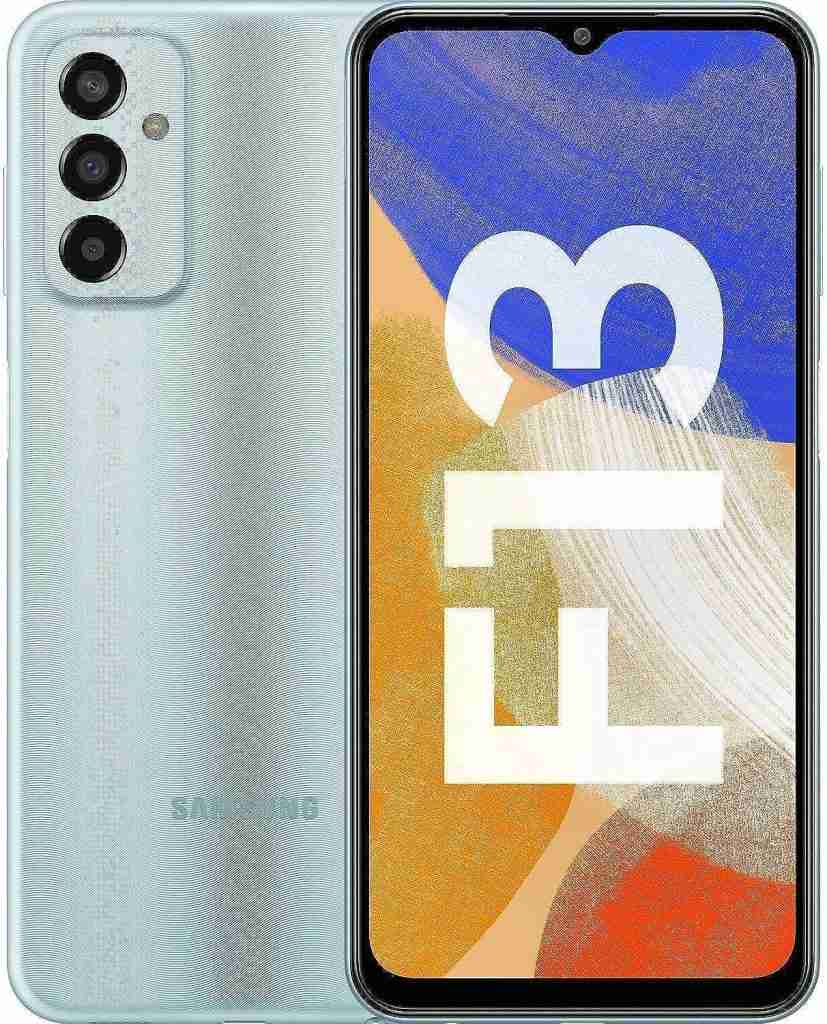
The Galaxy F13 Up Close
Samsung announced the F13 in June 2022 with an Exynos 850 chip, a 6.6-inch PLS LCD under Gorilla Glass 5 and a 6,000 mAh battery with 15W charging. It is 9.3mm thick and weighs about 207g, and it has a USB-C port with OTG support, a 3.5mm headphone jack and a dedicated microSD slot.
Four-plus years of long charging sessions leave a mark on the port first and then on the cell. After the charging system we test the screen, touch, the side fingerprint sensor and the headphone jack, and we tell you if anything else looks marginal before the phone goes back to you.
- Screen replacementYes
- Battery replacementYes
- Charging port repairYes
- Back glass / back cover replacementYes
- Board-level / microsolderingYes
- Water damage / data recoveryYes
- Mobile on-site serviceWithin ~1 hour
From Broken to Back in Your Pocket
Four steps, no guessing.
Use the form, text a photo or call. Tell us if it is slow, hot, loose at the port or physically damaged.
We test the cable, port, battery and screen, and check the frame for cracks or moisture.
The cause, the cost and our honest advice go on paper. Work starts only after you agree.
After the repair we run touch, charging, headphone jack, Wi-Fi and camera tests before handing the phone back.
Before You Bring It In
A few small steps speed everything up.
- Stop using it if loose glass can cut you
- Back up photos if the phone still turns on
- Bring your charger if the problem is charging
- If it got wet, power it off right away
Galaxy F13 Repair Pricing
We leave dollar amounts off this page because the F13 is mostly sold outside the US and parts are ordered per job. Ask for a quote and the exact price comes back in writing before any work begins.
Common Galaxy F13 Repairs
The four fixes we expect most on this model.
Samsung Galaxy F13 Screen Repair
Cracked glass, a dim or shadowed patch, bright lines or touch that stopped responding. We replace the 6.6-inch LCD and test brightness and touch before the phone goes back.
Get a QuoteSamsung Galaxy F13 Battery Replacement
A 6,000 mAh cell that no longer lasts, runs hot while charging or lifts the back cover. We check for swelling, fit a fresh battery and watch it charge.
Get a QuoteSamsung Galaxy F13 Charging Port Repair
A loose plug, charging that stops and starts or a port worn by years of drives and adapters. We clear the USB-C port first and replace it only if the contacts are worn.
Get a QuoteSamsung Galaxy F13 Back Glass Replacement
A cracked or scuffed back after four years of daily use. We fit a new back cover without touching the screen and check that the frame closes flat.
Get a QuoteEvery Fix for the Galaxy F13
Open a card for the symptoms and what we do.
Galaxy F13 Screen Replacement
We fit a replacement screen and test touch, brightness and the side fingerprint sensor before the phone goes back to you.
- Cracked or chipped glass
- Dim or shadowed patches
- Touch that skips or lags
- Ghost touches with no finger on the screen
Galaxy F13 Touch Problems
We trace the fault to the glass, the screen or the board, so the repair you pay for matches the problem.
- Taps land in the wrong spot
- A strip of screen is dead
- The screen scrolls by itself
Galaxy F13 Battery Replacement
A fresh 6,000 mAh battery with the connector checked, so the phone closes properly and charges steadily.
- Runs flat far sooner than it used to
- Hot while charging
- Back cover bulging or a gap by the screen
Galaxy F13 Charging Port Repair
We clean the USB-C port first and replace it only if that does not restore a firm connection.
- Charges only at one angle
- Cable wiggles or falls out
- Phone ignores a known good cable
Galaxy F13 Back Cover Replacement
We fit a new plastic back cover, leave the screen alone and check the frame so the housing sits flat.
- Cracks across the back
- Cover lifting at the edges
- Phone rocks on a flat table
Galaxy F13 Board-Level Repair
Board-level work happens on our own benches at Watertown and Wakefield, a service many chains turn away.
- Dead after a hard drop
- Stuck on the logo
- Will not charge though port and battery are fine
Galaxy F13 Water Damage Repair
Power it off and keep it away from chargers. We open it, clean the board and test each function.
- Submerged too long
- Failing after a spill
- Dead after getting wet
Battery, Port or Screen?
Three checks you can run before visiting.
Try a different USB-C cable and adapter. If charging returns to normal, the old pair was worn. If not, the port or battery is next.
A phone that jumps from 20 percent straight to off points at an aged battery. One that reboots at random may need a board check.
A gap around the screen or a back cover that bows outward can mean a swollen battery. Stop charging it and bring it in.
Still unsure? Book the free diagnostic and we test it with you.
Notes for Galaxy F13 Owners
What we keep in mind with this phone.
Slow charging by design
At 15W, a 6,000 mAh phone charges slowly even when healthy. If it has become slower, or stops and starts, suspect the cable, the port or the cell.
The port does double duty
With OTG support, the USB-C port also connects drives and adapters. All that plugging wears the contacts, and it is often the real fault.
Heat is the warning sign
A phone that gets hot while charging, or whose back cover is lifting, needs a look at the battery before anything else.
Imported means parts are ordered
The F13 is mostly sold outside the US, so we source parts per job. That is why we quote after a diagnostic instead of posting a fixed price.
Stop By or Book a Visit
Four shops in eastern Massachusetts, plus mobile visits within about an hour of any of them.
Come to Watertown, Wakefield, Newton or Burlington. We look at the phone with you and explain the plan first.
- Walk-ins welcome
- Board-level work done in-house
A technician comes to your home or office, checks the phone and tells you whether it is fixable on the spot or needs the shop bench.
- Same pricing as in-shop
- Handy when you cannot leave work
Your Options, Side by Side
Three common routes for a Galaxy F13.
| What matters | Fix 'N Repair | Samsung / Authorized Service | Typical Repair Chain |
|---|---|---|---|
| Mobile on-site visits | Yes, within ~1 hour | ||
| Board-level repair | At Watertown and Wakefield | ||
| Walk-ins | Welcome at all 4 shops | Varies by location |
Accuracy note: Fix 'N Repair is independent and not a Samsung Authorized Service Provider. This reflects general industry patterns as of November 2026, not any specific company's current policy. Questions? Call (857) 302-2655.
Visit One of Our Shops
Real storefronts, photographed by us.


Wakefield also serves through reading.fixnrepair.org.
More Samsung Repairs Here
Have a different Samsung? We repair phones and tablets.
The full range is on our Samsung repair page.
Galaxy F13 Repair Questions
What owners ask us most.
What does a Galaxy F13 repair cost?
Screen, battery, charging port and back cover are each quoted on their own. We keep dollar figures off this page because the F13 is mostly sold outside the US and we order parts for each job, so the price moves. Send a photo or call (857) 302-2655. You get the exact price in writing before we start, and nothing begins until you approve it.
My F13 has a 6,000 mAh battery but takes hours to charge. Is that normal?
Partly. The F13 charges at 15W, so filling a 6,000 mAh cell from empty is a long job even when everything is healthy. If it is slower than it used to be, or stops and starts, the cause is usually a worn port, a tired cable or an aged battery. We test them in that order.
My F13 gets warm while charging. Should I worry?
Mild warmth is normal. A phone that gets properly hot, smells odd or has a back cover that is lifting is not. Those point to a swollen battery, a bad cable or a damaged port. Stop charging it and bring it in. We check the cell and the port, and we replace what is at fault.
My F13 supports OTG. Can the port handle flash drives and adapters?
It can, but every plug and unplug wears the contacts. The F13 has a USB-C port with OTG support, so people connect drives and adapters as well as chargers. If the port feels loose or only connects at one angle, we clear the lint first and replace the port if the contacts are worn.
The back of my F13 is cracked. Does the screen have to come off?
No. The back and the frame are plastic, so the cracked cover comes off on its own and the screen is not touched. We fit a new back cover and check that the frame closes flat. You approve the price in writing first, and we tell you if the frame is damaged.
What warranty comes with a Galaxy F13 repair?
Battery, charging port, back cover and board-level repairs carry our 90-day warranty on parts and labor. Water damage and customer-supplied parts are not covered. Screen coverage depends on the part we install, so the exact terms are written on your quote before you approve the work. Keep your text or email receipt, because every warranty claim starts there.
Towns We Serve
Shops in Watertown, Wakefield, Newton and Burlington, plus mobile visits within about an hour of each.
Galaxy F13 Specs
Handy when describing your phone to us. Official details are on Samsung's website.
Galaxy F13 Repair, Plainly Explained
Short answers on the problems we expect.
The LCD panel is the main cost, and on an older phone we weigh it against what the phone is worth. Cracked glass over a working display is simpler than a damaged panel or a bent frame. Send a photo showing the symptoms and you get an exact quote.
That usually means the backlight layer or the LCD itself is damaged, often after a drop or pressure on the glass, and sometimes with no visible crack. A replacement screen fixes it. We check the board first so nothing else is failing underneath.
Warmth is normal, real heat is not. We test the cable and port first, then the 6,000 mAh cell for swelling or wear, and replace what is at fault. We confirm charging with a cable we trust before the phone goes home.
Stop charging it. A swollen battery is a safety issue and has to be replaced, not pressed back into place.
That is a worn or lint-packed USB-C port. We clean it carefully first, and if it is loose or bent we replace it and test charging from several angles.
Power it off and keep it away from chargers. Moisture keeps corroding the board, so bring it in quickly and we open it up and clean it.
If the quote would approach the price of a new budget phone, or we find serious liquid or board damage, we say so plainly after the free diagnostic. The decision is yours.
Making the Repair Last
Everyday habits that help a repaired phone last.
Gorilla Glass 5 fights scratches better than hard drops. A flat screen protector takes the first scratch and keeps touch responsive.
A phone charging under a pillow or on a bed runs hotter. Use a good cable and keep the port free of lint.
Your text or email receipt is your warranty record. Save it somewhere you can find it.
Get Your Galaxy F13 off the charger for longer.
Free diagnostic, one written price before we start, and a 90-day warranty on non-screen repairs.
Or call direct: (857) 302-2655