
Samsung Galaxy Tab S9 Repair — Free Diagnostic
We repair the Samsung Galaxy Tab S9 — screen, battery, and charging port — at all four of our Massachusetts shops. Prices are confirmed after a free diagnostic. Fill out the form, text us, or call for your quote.
What type of device needs repair?
Choose the category that best describes your device.
Same Shop, Same Standard, Any Location
Watertown, Wakefield, Newton, or Burlington — the reviews describe the same visit every time: honest diagnosis, real prices, no pressure.


About the Galaxy Tab S9
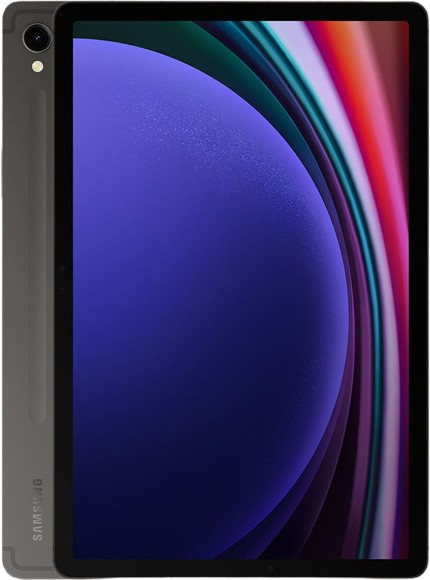
The Galaxy Tab S9 is Samsung's big-screen Android tablet: a 11-inch Dynamic AMOLED 2X display at 120Hz, a 8,400 mAh battery, and a body only 5.9mm thick. It was announced in July 2023. We haven't published exact pricing for this model — we inspect it first and confirm your price before any work starts.
A tablet this thin and this large takes a knock differently than a phone. A bent corner, a lifted screen edge, or a dim patch can all look like "a cracked screen" from the outside. We diagnose first and tell you plainly what is and isn't worth repairing.
- Screen replacementYes — quoted after diagnostic
- Battery replacementYes
- Charging portYes
- Same-day repairOnly if the part is on hand
- Board-level / microsolderingYes — Watertown & Wakefield
- Water damage / data recoveryYes
- Mobile (on-site) servicePhones only — tablets in-store
- Warranty90 days on repairs
What to Expect
Four steps, from your first message to walking out with a fixed phone.
Fill out the form, text a photo, or call. We ask a few questions and start narrowing down the cause.
We check the screen, the battery, and the charging port, and confirm what's actually wrong before quoting anything.
We tell you the exact number and which parts it covers before touching the tablet. No surprise charges after.
Timing depends on the repair and on whether the part is on hand. We give you a realistic estimate at diagnosis, before any work starts. Board-level or water damage work takes longer.
Before You Bring It In
A short list that makes your visit faster — nothing complicated.
- Remove the case or keyboard cover, and bring them along if the issue is with the keyboard connection
- Don't keep pressing on a cracked or lifting screen — send us a photo first
- Bring your charger if the issue is charging-related
- If it's water damage, don't charge it or turn it on — bring it in as-is, fast
Galaxy Tab S9 Repair Pricing
We haven't published exact Galaxy Tab S9 pricing yet. Request a quote and we'll confirm your exact price before any work starts, based on what your tablet actually needs. Quoted prices don't include 6.25% Massachusetts sales tax.
The Repairs We See Most on the Galaxy Tab S9
Four jobs that make up most Galaxy Tab S9 requests. Quoted after a free diagnostic.
Galaxy Tab S9 Screen Repair
Cracked glass, lines, dark patches, or touch that stopped responding on the 11-inch display.
Get a QuoteGalaxy Tab S9 Battery Replacement
Drains fast, shuts off at a high percentage, or takes forever to charge. We confirm the cause before quoting.
Get a QuoteGalaxy Tab S9 Charging Port Repair
Won't charge, or only at an angle. We clean first and confirm that solved it before quoting a replacement.
Get a QuoteGalaxy Tab S9 Display & Touch Check
Ghost touches, dim areas, or a screen that flickers. We find the cause before quoting.
Get a QuoteGalaxy Tab S9 Repair Services
Every hardware repair we offer for this model. Tap a card for symptoms and details.
Galaxy Tab S9 Screen Replacement
On an AMOLED tablet the glass and the display are usually one unit, so a cracked screen often means replacing the whole display. We inspect it, tell you what we find, and quote before we start.
- Cracked glass, with or without lines
- Dark or colored patches on the display
- Touch not responding in some areas
Galaxy Tab S9 Battery Replacement
With a 8,400 mAh battery, a worn one is easy to notice. We confirm the battery is the real cause before quoting a replacement.
- Shuts off above 20%
- Barely lasts a few hours of normal use
- Back panel bulging or screen lifting
Galaxy Tab S9 Charging Port Repair
Cleaned or replaced depending on the issue — we tell you which one you need before charging you for it.
- Only charges at certain angles
- Cable falls out on its own
- Charging is intermittent
Galaxy Tab S9 Display & Touch Diagnosis
Touch and display faults can come from the screen or from the board. We test first and tell you honestly which repair makes sense.
- Taps registering on their own
- Screen flickers or goes dim in patches
- Fingerprint reader stops responding
Galaxy Tab S9 Motherboard Repair
Most chain shops turn away no-power devices. We do board-level diagnosis in-house at Watertown and Wakefield, and give you an honest timeline after we look.
- Won't power on after a battery swap
- Stuck on the Samsung logo
Galaxy Tab S9 Water Damage Repair
Power it off immediately, don't charge it, bring it in fast. Full disassembly and cleaning, not the "rice trick." Water damage repairs carry no warranty.
- Spill on the screen or keyboard cover
- Won't turn on after getting wet
Galaxy Tab S9 Data Recovery
If the tablet won't start, we can often tell you whether your files are recoverable before you commit to a repair.
- Tablet won't turn on
- Screen is dead but files matter
Is It the Battery, or Something Else?
Battery symptoms can look like software issues. Three quick checks before you book a repair.
Settings > Battery. Look for degraded capacity or a warning message. A recent software update can also cause temporary drain — this often resolves itself within a few days.
If drain started right after an update, enable Adaptive Battery and give it 24-48 hours. Software-caused drain usually settles down; hardware wear doesn't.
Shutting off well above 20% remaining, getting hot during normal use, or physical swelling are hardware signs — that's when a replacement actually helps.
Still not sure? Get a free diagnostic and we'll tell you straight whether it's the battery.
What Galaxy Tab S9 Owners Are Reporting
Real points that come up with this tablet — useful context if you're deciding whether something is a repair issue or just how a slim tablet behaves.
IP68 is not a license to soak it
The Tab S9 is rated IP68, but that rating applies to a factory-sealed tablet. A hard drop or an earlier repair can compromise the seal, and a spilled drink can still reach the inside. If it gets wet, power it off and bring it in before you try to charge it.
Fingerprint reader sits under the screen
The Tab S9 uses an optical fingerprint sensor under the display, not a button. A cracked or lifting screen can make it read unreliably, so we test the reader during the diagnostic. Face unlock working while the fingerprint doesn't is a useful thing to tell us.
A thin, large panel flexes
At 5.9mm thick and 11 inches across, the Tab S9 flexes more than a phone when it is carried loose. Many cracked screens start from pressure in a bag, not from a drop. If yours has a hairline crack and no impact, that is a common cause.
A swollen battery is urgent
If the back panel is bulging or the screen is lifting at the edges, stop charging the tablet and bring it in. Please don't press on it or try to pry it open. A swollen battery is a safety issue as much as a repair.
Walk In, or Have Us Come to You
Bring your tablet to any of our four Massachusetts shops. Mobile service is for phones only.
Watertown, Wakefield, Newton, or Burlington. Free diagnostic, and tablet repairs are quoted after we inspect the device.
- Walk-ins welcome — call ahead so we can check whether the part is on hand
- Board-level work in-house at Watertown & Wakefield
Our on-site mobile service covers phones only. A tablet like the Tab S9 needs to come to one of our shops, where we can inspect it properly.
- Mobile service: phones only
- Tablet repairs are done in-store at any of our four shops
How We Compare
An honest look at three real paths for getting a Galaxy Tab S9 fixed.
| What matters | Fix 'N Repair | Samsung / Authorized Service | Typical Repair Chain |
|---|---|---|---|
| Mobile / on-site service | We come to you, van repair | ||
| Board-level repair | In-house at Watertown & Wakefield | ||
| Walk-in / appointment | Walk-ins welcome, 4 shops | Varies by location |
A note on accuracy: Fix 'N Repair is independent and not a Samsung Authorized Service Provider. This reflects general, publicly known industry patterns as of July 2026, not claims about any specific company's current policies. Call (857) 302-2655 with questions.
Any of Our 4 Massachusetts Shops
Real photos of each location — not stock images.


Wakefield also runs at reading.fixnrepair.org.
We Repair Every Galaxy Series
Not a Galaxy Tab S9? We fix the full Samsung lineup at all 4 shops.
See every model and repair we offer on our Samsung Repair hub page.
Galaxy Tab S9 Repair FAQ
Quick answers to what people ask us most about this model.
How much does it cost to fix a Galaxy Tab S9 screen?
We haven't published exact Galaxy Tab S9 pricing yet. The cost depends on whether the glass and display, the battery, or something else is the real problem. Call (857) 302-2655, text us a photo, or fill out the quote form. We inspect the tablet first and confirm your price before any work starts. Quotes don't include 6.25% Massachusetts sales tax.
My Tab S9 glass is cracked but it still works. Can you fix only the glass?
On an AMOLED tablet the glass and the display are usually bonded together, so a crack generally means replacing the display assembly. We check during the free diagnostic and tell you honestly what your tablet needs. Please don't keep pressing on a cracked screen, since it can spread and cause touch problems or lines.
Can you repair my Galaxy Tab S9 the same day?
Sometimes, but we can't promise it. We keep iPad parts in stock, while Samsung tablet parts are same-day only if the right one is on hand. Call ahead with your exact model number and we'll tell you whether the part is here or needs ordering, and give a realistic timeline. You won't make a trip for nothing.
Do you offer mobile service for the Galaxy Tab S9?
No. Our on-site mobile service covers phones only, within about an hour of any of our shops. A tablet like the Tab S9 needs to come to one of our four shops in Watertown, Wakefield, Newton, or Burlington, where we can inspect it properly. Call us and we'll tell you which store is best for your repair.
Will replacing my Galaxy Tab S9 screen wipe my data?
No. A screen replacement doesn't touch your storage or software, so a backup isn't necessary for that specific repair. Water damage and board-level repairs are different — they carry real data risk, and we'll tell you upfront if yours falls into that category. We still recommend keeping a general backup as good practice for any device.
How long is the warranty on a Galaxy Tab S9 repair?
Tablet repairs carry a 90-day warranty. The lifetime screen warranty applies to phone and iPad screens only, so it does not apply to the Tab S9. Water damage repairs and customer-supplied parts carry no warranty. To make a claim, bring proof of the original repair: a paper receipt, a photo of it, or a text or email receipt.
Where We Service
In-shop at Watertown, Wakefield, Newton, and Burlington. Mobile service is available for phones only.
Galaxy Tab S9 Specs at a Glance
Quick reference before you bring it in — helps us pull the right parts. Full official specs live on GSMArena's Galaxy Tab S9 page.
Galaxy Tab S9 Repair — Everything You Need to Know
A closer look at cost, turnaround, and what we actually do for the most common Galaxy Tab S9 problems.
We haven't published exact Galaxy Tab S9 pricing yet, and we'd rather say so than guess. The number depends on whether it is the glass and display, the battery, or something on the board. Call (857) 302-2655, text a photo of the damage, or use the quote form — your price is confirmed after diagnosis, before any work starts. Quotes don't include 6.25% Massachusetts sales tax.
The Tab S9 has a Dynamic AMOLED 2X panel, and on this kind of display a cracked glass often goes together with a damaged panel underneath. Lines, dark patches, and dead touch zones are usually the panel, not a loose cable. We inspect first and tell you plainly what we find before anything is opened.
Most of the time it's lint or debris in the USB-C port, so we clean first. If that doesn't fix it, the port is next, and after that the battery or the board. We confirm the real cause before quoting a replacement, so you only pay for the part that is actually failing.
The Tab S9 pairs a 11-inch Dynamic AMOLED 2X display at 120Hz with a Snapdragon 8 Gen 2 and a 8,400 mAh battery, in a body 5.9mm thick and 498g. It was announced in July 2023. The big panel is the most exposed part and the large battery is the most common wear item, so those are the two repairs we see most.
If you're searching "Galaxy Tab S9 battery draining fast," check Settings > Battery for degraded capacity first and rule out a recent update. A tablet shutting off well above 20%, getting hot on a normal charge, or showing a bulging back or lifting screen usually points to the battery itself. We confirm during the free diagnostic.
Yes, it carries an IP68 rating, but that applies to a factory-sealed tablet. If yours got wet, power it off immediately, skip the charger, and bring it to us fast. Water damage repairs carry no warranty, and opening any device may remove whatever sealing it had. Water damage is quoted separately after we open the tablet.
We keep iPad parts in stock, so many iPad repairs are done the same day. Samsung tablets are different: we can only do same-day if the right part happens to be on hand. Call ahead with your exact model and we'll tell you whether the part is here or needs to be ordered.
After Your Repair — Care Tips
A few small habits that make the repair last.
A thin 11-inch tablet flexes under pressure. Keep it in a padded case or sleeve, and don't put a heavy bag on top of it. Many cracked screens start from pressure, not from drops.
After a battery replacement, letting the phone reach 100% on its first charge helps the battery gauge calibrate accurately going forward.
Text or email receipts are valid for warranty claims — save it somewhere you'll find it later, not just in the shop bag.
Your Galaxy Tab S9, diagnosed free.
Free diagnostic, exact price confirmed before any work starts. Bring it to any of our four shops.
Or call directly: (857) 302-2655